LGA

The land grid array (LGA) is a type of surface-mount packaging for ICs that is notable for having the pins on the socket rather than the IC. An LGA can be electrically connected to a PCB either by the use of a socket or by soldering directly to the PCB.

USE IN MICROPROCESSORS

The LGA is used as a physical interface for microprocessors of the Intel Pentium 4 (Prescott), Intel Xeon, Intel Core 2, Intel Core (Bloomfield and Lynnfield) and AMD Opteron families. Unlike the pin grid array (PGA) interface found on most AMD and older Intel processors, there are no pins on the chip; in place of the pins are pads of bare gold-plated copper that touch pins on the motherboard.
While LGA sockets have been in use as early as 1996 by the MIPS R10000 and HP PA-8000 processors, the interface did not gain widespread use until Intel introduced their LGA platform starting with the 5x0 and 6x0 sequence Pentium 4 (Prescott) in 2004. All Pentium D and Core 2 desktop processors currently use an LGA socket. As of Q1 2006 Intel switched the Xeon server platform to LGA starting with the 5000-series models. AMD introduced their server LGA platform starting with the 2000-series Opteron in Q2 2006. AMD offers the Athlon 64 FX-74 on socket 1207FX through ASUS's L1N64-SLI WS motherboard as the only desktop LGA solution in the desktop market from AMD currently.
The most common Intel desktop LGA socket is dubbed LGA 775 (Socket T) while the server variant is dubbed LGA 771 (Socket J). However, the new Intel Core i7 and i7 Extreme families uses the LGA 1366 (Socket B) socket. As of September 2009, the new Core i5 700 series and the Core i7 800 series - codenamed Lynnfield - use LGA 1156 (Socket H) Intel supposedly decided to switch to an LGA socket because it provides a larger contact point, allowing, for example, higher clock frequencies. The LGA setup provides higher pin densities, allowing more power contacts and thus a more stable power supply to the chip. LGA packaging also has a tertiary benefit of placing pins onto the motherboard; if a pin breaks, the motherboard is often cheaper to replace than the CPU chip (as compared to a PGA chip/socket setup).
The AMD server LGA socket is designated Socket F (LGA 1207) Similar to Intel, AMD decided to use an LGA socket because it allows higher pin densities. The required size of a 1207-pin PGA would simply be too large and would consume too much space on motherboards.

SOCKET 775 ON A MOTHERBOARD
LGA 775 PROCESSOR
 PROCESSORS WITH LGA ARE SOCKET F (LGA 1207), SOCKET C32 (LGA 1207) AND SOCKET G34 (LGA 1974)

INTEL PROCESSOR WITH LGA ARE LGA 775 (SOCKET T), LGA 771 (SOCKET J), LGA 1366 (SOCKET B), LGA 1156 (SOCKET H), LGA 1155 (SOCKET H2) AND LGA 2011 (SOCKET R)

INTEL processors

Intel Corporation (NASDAQ: INTC; SEHK: 4335; Euronext: INCO) is an American global technology company and the world's largest semiconductor chip maker, based on revenue.[4] It is the inventor of the x86 series of microprocessors, the processors found in most personal computers. Intel was founded on July 18, 1968, as Integrated Electronics Corporation (though a common misconception is that "Intel" is from the word intelligence) and is based in Santa Clara, California, USA. Intel also makes motherboard chipsets, network interface controllers and integrated circuits, flash memory, graphic chips, embedded processors and other devices related to communications and computing. Founded by semiconductor pioneers Robert Noyce and Gordon Moore and widely associated with the executive leadership and vision of Andrew Grove, Intel combines advanced chip design capability with a leading-edge manufacturing capability. Originally known primarily to engineers and technologists, Intel's "Intel Inside" advertising campaign of the 1990s made it and its Pentium processor household names.
Intel was an early developer of SRAM and DRAM memory chips, and this represented the majority of its business until 1981. While Intel created the first commercial microprocessor chip in 1971, it was not until the success of the personal computer (PC) that this became their primary business. During the 1990s, Intel invested heavily in new microprocessor designs fostering the rapid growth of the computer industry. During this period Intel became the dominant supplier of microprocessors for PCs, and was known for aggressive and sometimes controversial tactics in defense of its market position, particularly against AMD, as well as a struggle with Microsoft for control over the direction of the PC industry.[5][6] The 2010 rankings of the world's 100 most powerful brands published by Millward Brown Optimor showed the company's brand value at number 48.[7]

COMMON INTEL PROCESSORS NOW A DAYS 
INTEL SOCKET 478 PROCESSOR (PGA)
INTEL PENTIUM 4, CELERON, PENTIUM 4 EE, PENTIUM 4 M PROCESSORS
  • year inroduced 2000
  • buss speed 400 - 800 MT/s (100 - 200 MHz)
  • 478 pins
  • processor dimension 1.38 × 1.38 inches
  • pin pitch 1.27 mm
  • package (PGA)                               
INTEL (LGA pinless) 775 PROCESSOR
INTEL PENTIUM 4, PENTIUM D, CELERON, CELERON D, PENTIUM XE, CORE2DUO, CORE2QUAD AND INTEL XEON PROCESSORS
  • year introduced 2004
  • buzz speed 1600 MHz
  • number of contacts 775
  • processor dimension 1.47 × 1.47 inches (37.5mm)
  • contact pitch 1.09 mm x 1.17 mm
  • package (LGA)
INTEL CORE i7 PROCESSOR 900 SERIES
INTEL CORE i7 900 SERIES PROCESSORS, INTEL XEON 3500,3600,5500,5600 SERIES AND INTEL CELERON P1053 SERIES PROCESSORS
  • year introduced 2008
  • buzz speed 4.8 - 6.4 GT/s
  • number of contacts 1366
  • processor dimension 1.77 × 1.67 inches
  • package (LGA)
INTEL CORE i5 PROCESSOR 700 SERIES
INTEL CORE i7 800 SERIES, INTEL CORE i5 700 AND 600 SERIES, INTEL CORE i3 500 SERIES, INTEL XEON X3400 AND L3400 SERIES, INTEL PENTIUM G6000 SERIES AND INTEL CELERON G1000 SERIES PROCESSORS
  • year introduced 2009
  • buzz speed 2.5 GT/s
  • number of contact 1156
  • processor dimension 37.5 × 37.5 mm
  • package (LGA
coming intel processor are intel sandy bridge - DT (socket H2) LGA contacts 1155 and sandy bridge - B2 (socket R)  LGA contacts 2011. future availabiltiy on 2011.

This is my best way of introducing INTEL processors for more info just make some google or click here.You can visit Intel processors.

AMD processors

Advanced Micro Devices, Inc. (AMD) (NYSE: AMD) is an American multinational semiconductor company based in Sunnyvale, California, that develops computer processors and related technologies for commercial and consumer markets. Its main products include microprocessors, motherboard chipsets, embedded processors and graphics processors for servers, workstations and personal computers, and processor technologies for handheld devices, digital television, automobiles, game consoles, and other embedded systems applications.

AMD is the second-largest global supplier of microprocessors based on the x86 architecture and also one of the largest supplier of graphics processing units. It also owns 8.6% of Spansion, a supplier of non-volatile flash memory.[2] In 2009, AMD ranked eighth among semiconductor manufacturers in terms of revenue.[3]
COMMON AMD PROCESSORS NOW A DAYS.
AMD SEMPRON (SOCKET 754)
AMD ATHLON 64, AMD SEMPRON AND AMD TURION 64
  • year of introduction 2003
  • buzz speed 200-800 MHz
  • 754 pins
  • pin pitch 1.27 mm
  • PGA (package)

AMD ATHLON 64 X2 (SOCKET 939)
AMD ATHLON 64, FX ATHLON 64,ATHLON 64 FX, ATHLON 64 X2 AND AMD OPTERON
  • year of introduction 2004
  • buzz speed 200-1000 MHz
  • 939 pins
  • pin pitch 1.27 mm
  • PGA (package)
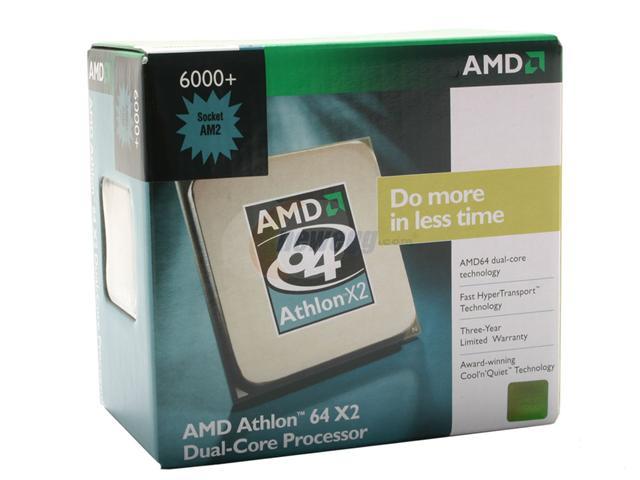
AMD ATHLON 64 X2 6000+ (SOCKET AM2)
AMD ATHLON 64 X2 AND AMD ATHLON 64 REPLACES SOCKET 754 & 939
  • year of introduction 2006
  • buzz speed 200 - 1000 MHz
  • 940 pins
  • pin pitch 1.27 mm 
  • PGA (package)
AMD PHENOM (SOCKET AM2+)
 AMD PHENOM, AMD ATHLON X2 AND AMD ATHLON 64 REPLACES SOCKET AM2
  • year of introduction 2007
  • buzz speed 200 - 2600 MHz
  • 940 pins
  • pin pitch 1.27 mm
  • PGA (package)
AMD PHENOM II X4 (SOCKET AM3)
 AMD PHENOM II, AMD ATHLON II AND AMD SEMPRON REPLACES SOCKET AM2+
  • year of introduction 2009
  • buzz speed 200 - 3200 MHz
  • 941 pins
  • pin pitch 1.27 mm
  • PGA (package)
AMD OPTERON 6000(SOCKET G34)/4000 SERIES(SOCKET C32) SERVER PROCESSORS
 AMD OPTERON 4000 SERIES REPLACES SOCKET F AND SOCKET AM3
  • year of introduction 2010
  • buzz speed 200 - 3200 MHz
  • 1207 pins
  • LGA (package)
 AMD OPTERON 6000 SERIES REPLACES SOCKET F
  • year of introduction 2010
  • buzz speed 200 - 3200 MHz
  • 1974 pins
  • LGA (package)
This is my best way of introducing AMD processors for more info just make some google or click here.You can visit AMD.

What is a Video Card?


A video card, video adapter, graphics accelerator card, display adapter, or graphics card is an expansion card whose function is to generate output images to a display. Many video cards offer added functions, such as accelerated rendering of 3D scenes and 2D graphics, video capture, TV-tuner adapter, MPEG-2/MPEG-4 decoding, FireWire, light pen, TV output, or the ability to connect multiple monitors (multi-monitor). Other modern high performance video cards are used for more graphically demanding purposes, such as PC games.

Video hardware can be integrated on the motherboard, often occurring with early machines. In this configuration it is sometimes referred to as a video controller or graphics controller. Modern low-end to mid-range motherboards often include a graphics chipset developed by the developer of the northbridge (i.e. an nForce chipset with nVidia graphics or an Intel chipset with Intel graphics) on the motherboard. This graphics chip usually has a small quantity of embedded memory and takes some of the system's main RAM, reducing the total RAM available. This is usually called integrated graphics or on-board graphics, and is low-performance and undesirable for those wishing to run 3D applications. A dedicated Graphics Card on the other hand has its own RAM and Processor specifically for processing video images, and thus offloads this work from the CPU and system RAM. Almost all of these motherboards allow the disabling of the integrated graphics chip in BIOS, and have an AGP, PCI, or PCI Express slot for adding a higher-performance graphics card in place of the integrated graphics. Despite the performance limitations, around 95% of new computers are sold with integrated graphics processors, leaving it for the individual user to decide whether to install a dedicated Graphics card.
Mounting a pci-express video card the blue slot is a pci-e slot available on a motherboard.

Motherboard with a AGP slot avialable(color brown).Usually found on old model motherboards.

AGP video card w/ DVI

PCI-Express Video Card w/ DVI

What is a CPU?

The CPU is the brains of the computer. Sometimes referred to simply as the central processor, but more commonly called processor, the CPU is where most calculations take place. In terms of computing power, the CPU is the most important element of a computer system.

On large machines, CPUs require one or more printed circuit boards. On personal computers and small workstations, the CPU is housed in a single chip called a microprocessor. Since the 1970's the microprocessor class of CPUs has almost completely overtaken all other CPU implementations.

The CPU itself is an internal component of the computer. Modern CPUs are small and square and contain multiple metallic connectors or pins on the underside. The CPU is inserted directly into a CPU socket, pin side down, on the motherboard. Each motherboard will support only a specific type or range of CPU so you must check the motherboard manufacturer's specifications before attempting to replace or upgrade a CPU. Modern CPUs also have an attached heat sink and small fan that go directly on top of the CPU to help dissipate heat.

Two typical components of a CPU are the following:
The arithmetic logic unit (ALU), which performs arithmetic and logical operations.
The control unit (CU), which extracts instructions from memory and decodes and executes them, calling on the ALU when necessary.


There two common cpu's found on computer stores nowadays the intel & AMD processors.


What is POST?

     POST stands for Power-On-Self-Test. The computer power-on self-test tests the computer to make sure it meets the necessary system requirements and that all hardware is working properly before starting the remainder of the boot process. If the computer passes the POST, the computer may have a single beep (with some computer BIOS suppliers it may beep twice) as the computer starts and the computer will continue to start normally.
First stage of a typical POST operation.
Bios Manufacturer : American Megatrends Inc.                          
Motherboard          : Asus P5KPL                                                 
Bios version            : 0603                                                   
CPU                        : Intel Pentium Dual CPU E2180 @ 2.00 Ghz
The second stage of a POST
This will show the boot sequence (usually you can see at the bottom boot from cd...) . And also you can see the hardisk, optical, floppy drive and controllers configuration at this stage.

What is a Motherboard?

       The motherboard is the most essential component in a personal computer . it is the piece of hardware which contains the computer's micro-processing chip and everything attached to it is vital to making the computer run.
DIFFERENT COMPONENTS OF A MOTHERBOARD

  • Power Connector
  • Memory Slot
  • IDE Connector
  • Northbridge
  • Southbridge
  • AGP Slot/PCIE Slot
  • PCI Slot
  • CMOS (backup battery)
  • CPU Socket
  • CPU Fan& Heatsink Mounting Points
  • Connectors for Intergrated Peripherals